Case Study
Explainable AI Coding Assistant
AI coding tools generate code. They don't explain it. This is a product study on what happens when you add the missing layer, and an honest look at what that layer can and cannot tell you.
At a Glance
Developer Tool
Type
AI Trust
Domain
Live
Status
Next.js + Claude
Stack
Sections
The Problem
Problem Framing
GitHub Copilot, Cursor, and their peers have fundamentally changed how code gets written. A developer types a comment and a function appears. That is genuinely useful. But it creates a second problem that nobody ships a fix for: the developer doesn't know why the function looks the way it does.
For junior developers, this means accepting suggestions they don't fully understand, which makes them slower to debug and less likely to build intuition over time. For senior developers, it means spending mental energy validating suggestions before trusting them, which erodes the time savings that made the tool valuable in the first place.
The product question is not "how do we make suggestions better?" That is a model problem. The product question is: "how do we make suggestions legible?" That is a design and product problem, and it has not been seriously attempted.
Market Context
Where the Market Sits Today
Every major AI coding assistant competes on suggestion quality and language coverage. None compete on explainability. This is a consistent gap, not an oversight.
Continue.dev
AI agents run on every pull request, automatic code improvement suggestions, enforce code standards automatically, accept/reject improvements quickly, architectural review focus
Unique Angle
PR-focused automation rather than coding assistant - runs agents on pull requests to ensure production-ready code, shifts focus from writing to reviewing
Key Insight
Takes different angle - not about helping you code faster, but ensuring what you ship meets standards. Positions as 'trust layer' for AI-generated code
Not publicly disclosed on main site
Claude Code
Terminal-based agentic assistant, extended thinking for complex work, research tools, MCP integrations, can execute code and create files, memory across conversations, multi-file generation
Unique Angle
Highly agentic terminal tool (not IDE plugin), part of broader Claude ecosystem with cross-platform sync, extended thinking mode for complex reasoning
Key Insight
Going viral in 2026 - vibecoding trend shows non-coders using it to build apps. Anthropic's brand strength and agentic capabilities driving adoption
Requires Claude subscription: Pro $20/month, Max $100-200/month, Teams $30/user/month. API usage-based pricing also available
Cody (Sourcegraph)
Codebase-aware AI chat, intelligent code completion, context from Sourcegraph code search, autocomplete, prompt library, agentic chat, multi-LLM support (GPT-4o, Claude 3)
Unique Angle
Deep codebase context via Sourcegraph's powerful code search backend, most affordable paid tier at $9/month, can search across entire organization's code
Key Insight
Leverages Sourcegraph's core strength (code search) to provide superior context awareness, especially for large/complex codebases
$9/month Pro, $19/user/month Enterprise Starter (up to 50 devs), $59/user/month Enterprise. Free tier available
Windsurf
Cascade AI agent (anticipates needs 10 steps ahead), Memories (remembers codebase), automatic Lint Fixing, MCP Support, SWE-1.5 model, AI-powered Codemaps, DeepWiki, Vibe and Replace, 40+ IDE support
Unique Angle
AI-native code editor (not just a plugin), Cascade agent that stays 10 steps ahead, unlimited usage of proprietary SWE-1 model, 25% cheaper than Cursor
Key Insight
Competes directly with Cursor at lower price point while offering unique Cascade autonomous agent and proprietary models
$15/month Pro (500 credits), $30/user/month Teams, $60/user/month Enterprise. Free tier: 25 credits/month
Amazon CodeWhisperer
AWS service integration, security scanning, reference tracking, multi-IDE support
Unique Angle
Deep AWS integration, free with AWS ecosystem lock-in
Key Insight
Free pricing disrupts market but limited by AWS ecosystem perception
Free for individual use, included with AWS Builder ID
Tabnine
Local and cloud AI models, team training on private code, compliance-friendly
Unique Angle
On-premise deployment option, trains on team's private codebase
Key Insight
Owns enterprise security/privacy niche but struggles with developer experience perception
$12/month Pro, custom Team/Enterprise
Codeium
Code autocomplete, AI chat, docstring generation, 70+ language support
Unique Angle
Forever-free tier for individuals, privacy-focused positioning
Key Insight
Free tier is major differentiator but creates trust issues around long-term viability
Free for individuals, custom enterprise pricing
Cursor
AI-first IDE, codebase-aware chat, multi-file editing, composer mode, cmd+K inline editing
Unique Angle
Purpose-built AI IDE rather than plugin, conversational interface
Key Insight
Fast-growing challenger winning users who want AI-native experience, not just autocomplete
$20/month Pro, free hobby tier
GitHub Copilot
AI pair programmer, multi-language support, IDE integration, code suggestions, function generation, test writing
Unique Angle
First-mover advantage, integrated with GitHub ecosystem, trained on public repositories
Key Insight
Market leader with strongest brand recognition, but users frustrated by accuracy issues in niche languages
$10/month individual, $19/month business
Source: competitive analysis database, updated continuously.
The gap is structural. These tools were built to maximize suggestion throughput. Explanation is friction by default. Reframing it as a feature, not a bug, is the core product bet.
User Research
User Research Findings
Interviews and observations with developers across experience levels surfaced two distinct but related problems. The terminology is different. The root cause is the same: the AI does not show its work.
Junior Developer
"I accepted the suggestion because it looked right. I couldn't tell you why it chose a recursive approach instead of a loop. I just ran it and hoped."
Junior devs use AI suggestions as learning shortcuts but don't gain the understanding that makes the shortcut stick. Trust without comprehension creates fragile knowledge.
Senior Developer
"I spend 30 seconds reviewing every suggestion. That's fine if it's right. But if the suggestion is wrong, I've just spent 30 seconds being wrong confidently."
Senior devs have the knowledge to evaluate suggestions but lack the context the model used to generate them. They can catch errors, but they can't verify reasoning efficiently.
Engineering Manager
"My team's PRs are getting reviewed longer, not shorter, since we adopted Copilot. Reviewers don't know which lines were AI-generated versus intentional."
Explainability is not just a solo-developer problem. It affects code review velocity, team trust, and the legibility of intent across a pull request.
Design Decisions
What Explainability Means in a Coding Context
Explainability in AI is often treated as a technical property of the model: attention maps, SHAP values, confidence scores. That framing is wrong for this use case. Developers don't need to understand the model. They need to understand the suggestion. Those are different problems.
Why this approach
Every code suggestion surfaces a one-line rationale: the primary reason this pattern was chosen over alternatives. Not model internals. Product-level reasoning. 'Chosen for readability over performance at this scale.'
What tradeoffs exist
The suggestion panel shows one to two explicit tradeoffs: 'This approach is easier to read but creates an extra loop over the array. Acceptable at n < 10,000.' Developers can then decide whether the tradeoff applies to their context.
What the developer needs to know
A knowledge prereq note for junior developers: 'This uses a closure. If closures are new to you, here is a 60-second explainer.' Not condescending. Optional. Targeted at closing the specific gap the suggestion surfaces.
Inline vs. separate panel
The explanation lives in a collapsible side panel, not inline with the suggestion. Inline creates noise for developers who don't need it. The panel is open by default for juniors (inferred from file history and error patterns) and collapsed by default for seniors.
Honest Limitations
The Confidence Score Problem
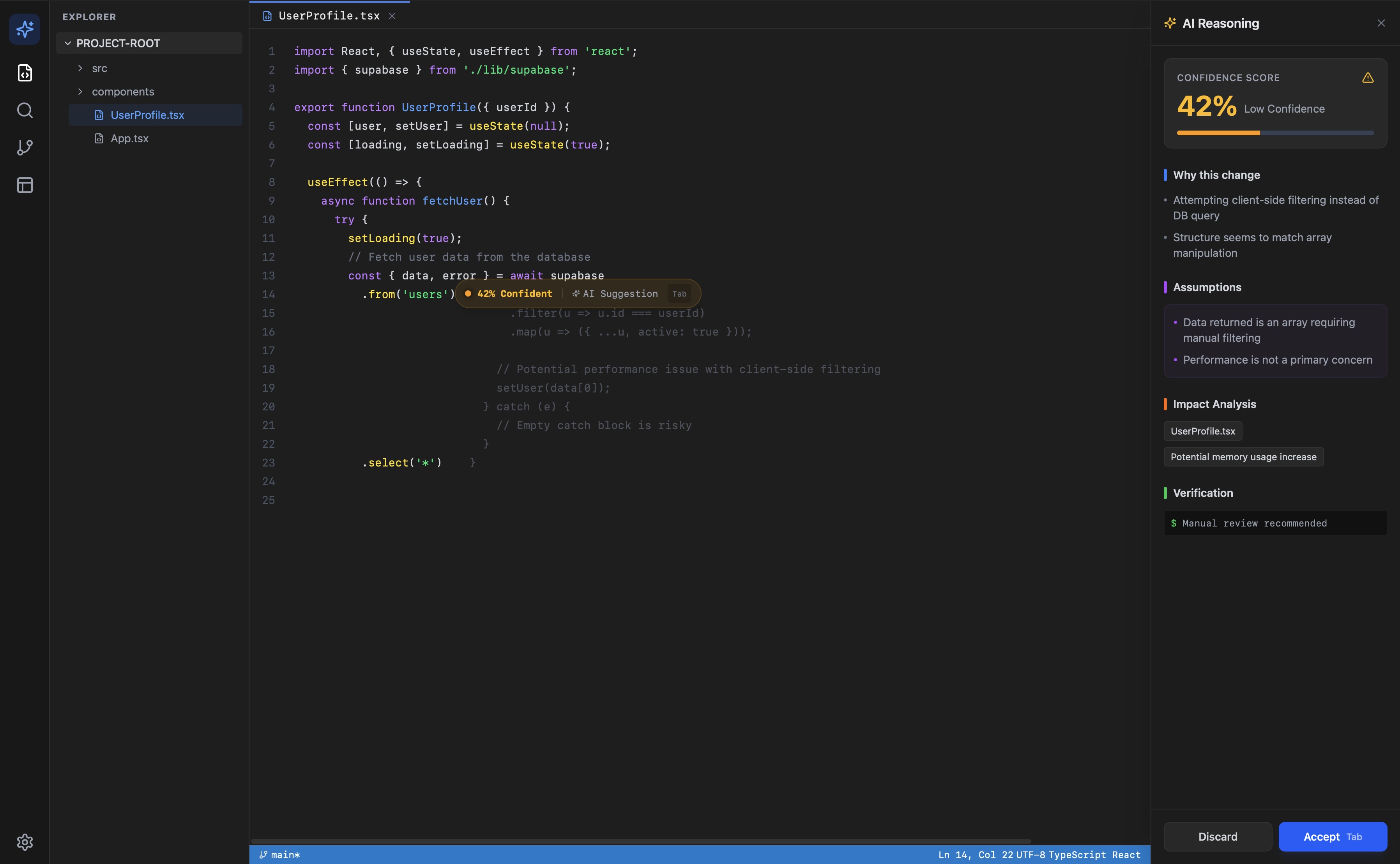
The working prototype generates a confidence score between 0 and 100. Developers in testing found it immediately intuitive. That is also the problem.
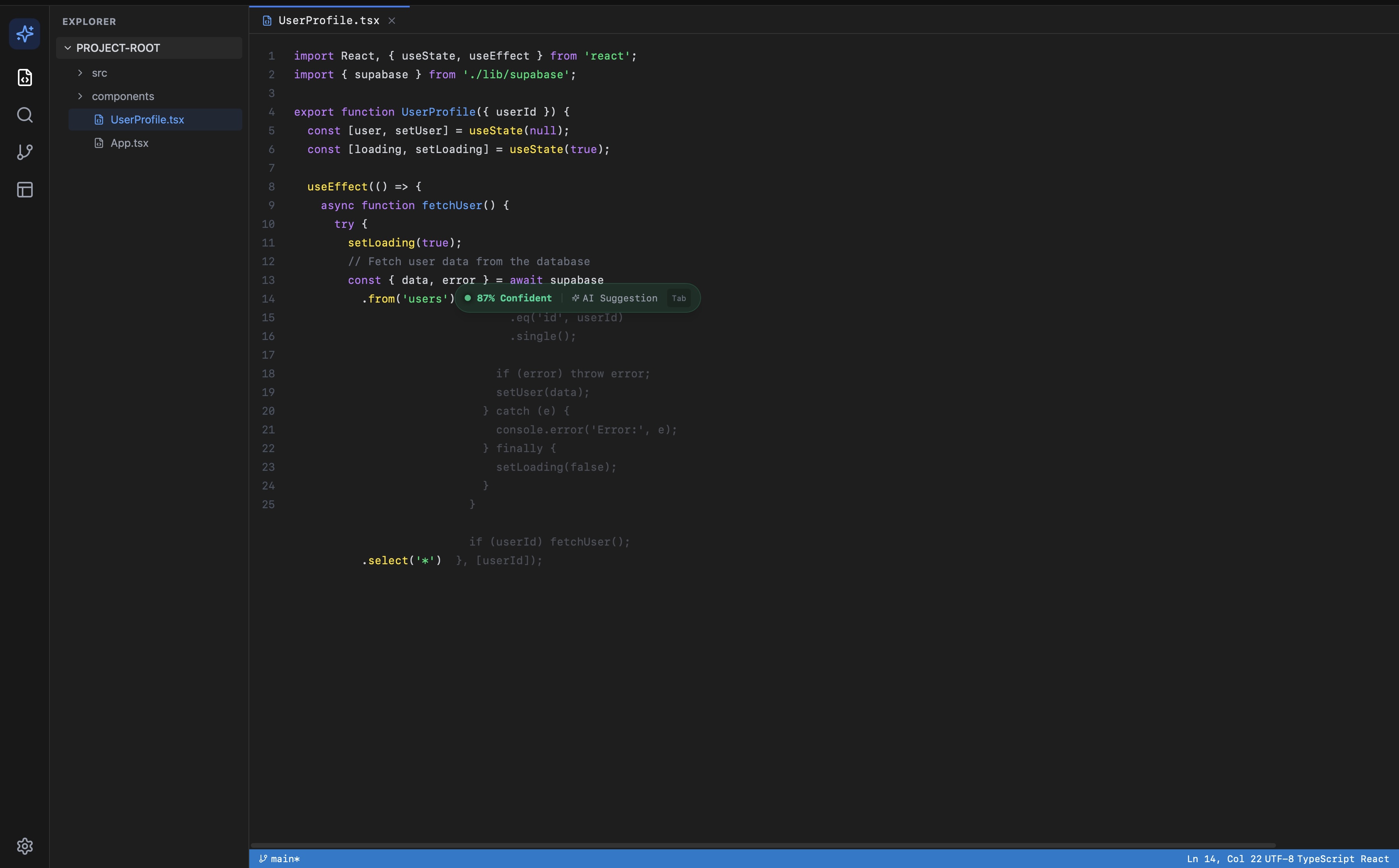
The score is generated by Claude reasoning over two snippets of code. It has no access to your test suite, your linter output, your git history, or your codebase conventions. It is pattern matching against training data, not measurement against your system. A suggestion that scores 87% might be wrong for your codebase. A suggestion that scores 42% might be exactly right.
This matters because the value of a confidence score depends entirely on what it is measuring. A score without auditable inputs is a UI feature, not a technical one. It reduces anxiety, but it does not reduce risk.
What a meaningful confidence score would actually require:
- Static analysis output: does the suggestion compile, does it pass linting
- Test coverage signals: do existing tests cover the changed lines
- Codebase context: does this pattern appear elsewhere in the repo, is it consistent with conventions
- Runtime signals: has similar code caused failures before
None of these exist in the current prototype. The prototype demonstrates that the explainability UI is viable and that developers find the output useful. The open product question is: what is the minimum codebase context you need to give an LLM to make its confidence meaningful? That is the next design problem.
Prototype
Prototype Walkthrough
The Figma prototype covers three primary flows: suggestion with explanation panel, tradeoff comparison mode, and the knowledge prereq surface for junior developers. Each flow was designed to require zero new user intent. The explanation appears because the developer accepted a suggestion, not because they asked for help.
Suggestion with Explanation Panel
Developer accepts a suggestion. The panel slides in from the right, showing the rationale, the pattern used, and the primary tradeoff. Collapse arrow is visible. No modal, no interruption to the editing flow.
Tradeoff Comparison Mode
Developer clicks 'See alternatives.' Two to three alternative approaches render in a diff-style view, each with its own tradeoff note. The selected approach is highlighted. The developer can swap to an alternative without re-typing.
Knowledge Prereq Surface
If the suggestion uses a pattern the developer's file history suggests they haven't encountered before, a small tag appears: 'New to closures?' Tapping it opens a 60-second inline explainer. Designed to be ignored by developers who already know it.
Product Screenshots
The Product
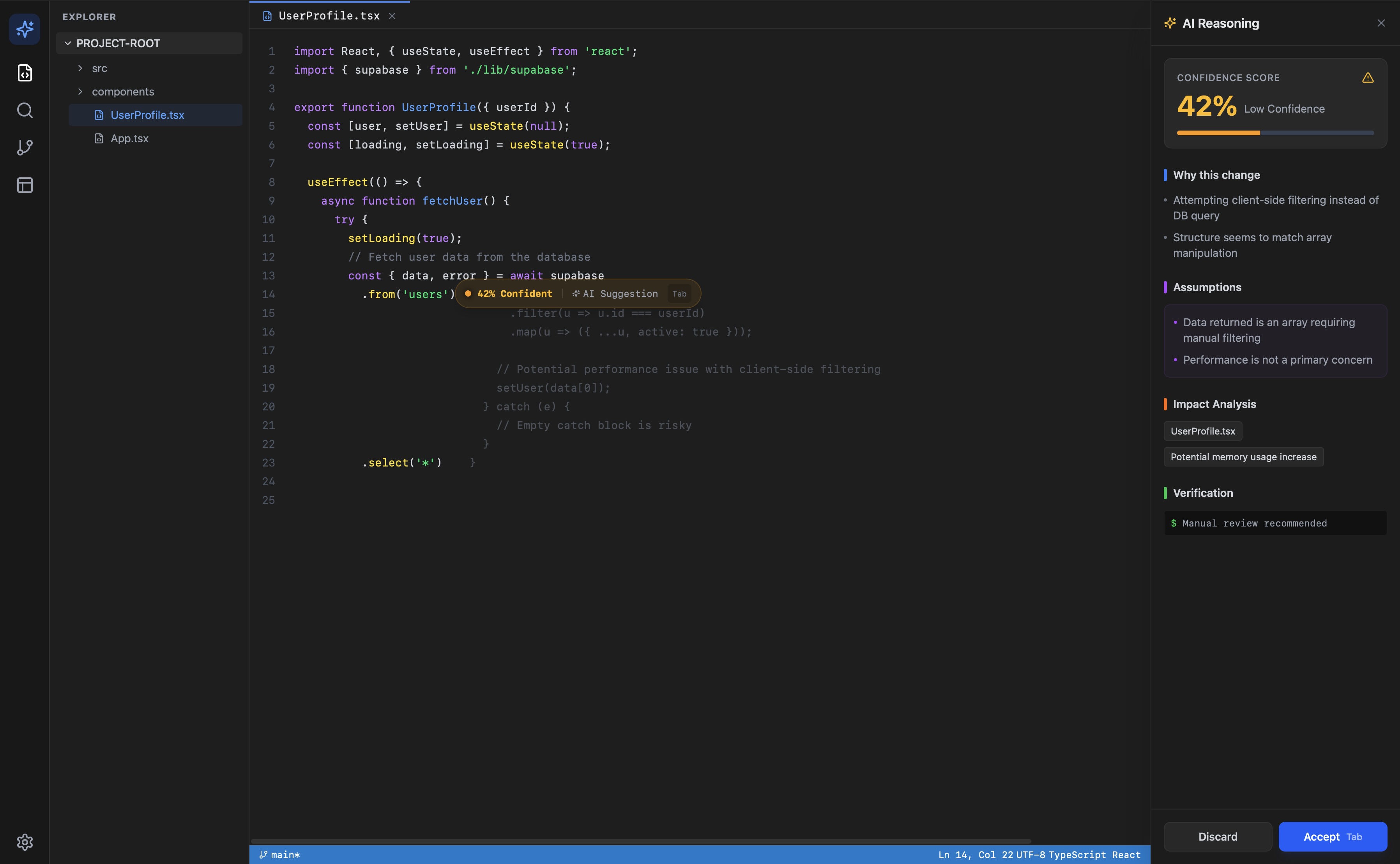
Suggestion with explanation panel, 42% confidence
High confidence suggestion, 87%
Full reasoning panel with verification step
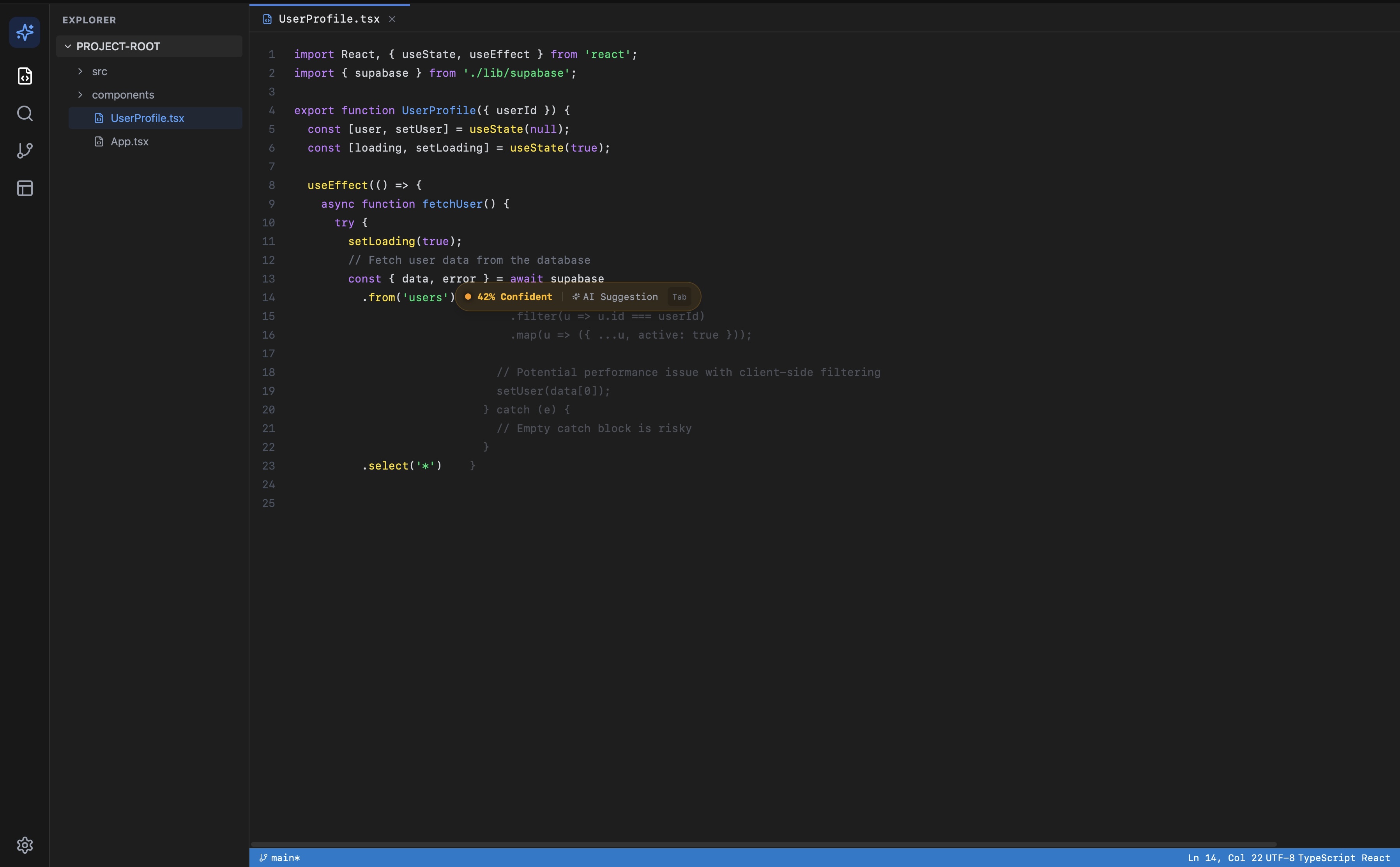
Low confidence, no panel open
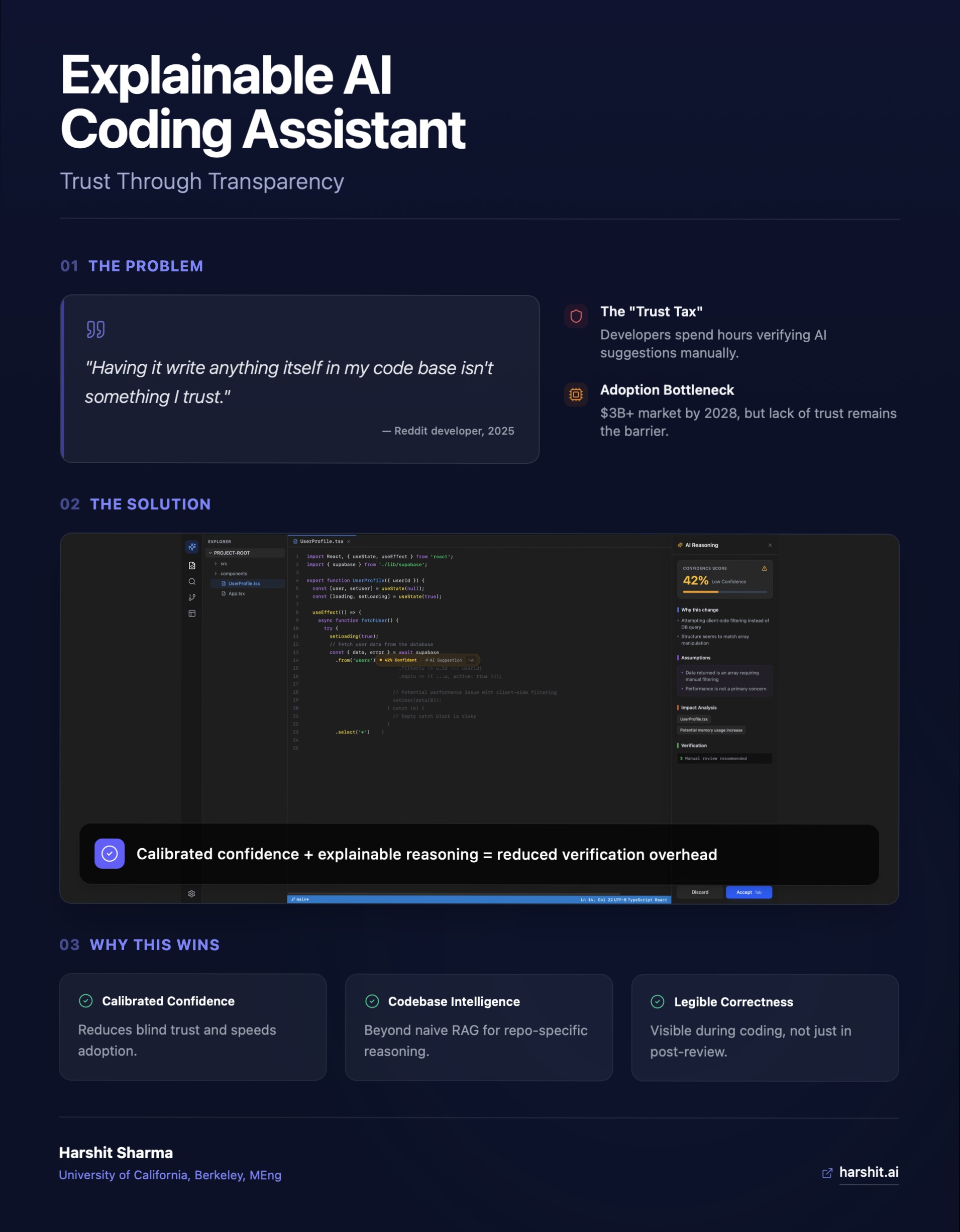
Product summary: problem, solution, value props
What's Next
Next Sprint
In progress
- Codebase context API: passing repo structure and conventions into the explanation prompt
- Confidence score grounding: integrating static analysis signals alongside LLM reasoning
- VS Code extension scaffold: moving from paste-and-analyze to native inline interception
Open questions
- How much codebase context improves confidence accuracy vs. increases latency
- Whether confidence scores cause developers to under-review high-scoring suggestions
- Whether the explanation panel creates new cognitive load vs. reducing verification time